radio-podcast-downloader
Radio Podcast Downloader


🇫🇷 Français · 🇬🇧 English version
Télécharger en lot tous les épisodes d’un podcast radio-podcast.fr dans un seul fichier
.zip.
Trois outils interchangeables :
- 🌐 Extension Chrome — un bouton sur la page, un prompt « où enregistrer », un
.zip. - 🐍 Script Python —
python3 scripts/download_episodes.py, aucune dépendance externe. - 🐚 Script Bash + curl —
./scripts/download_episodes.sh, autonome.
Pourquoi ?
Le site radio-podcast.fr liste des centaines d’épisodes de podcasts France Culture / France Inter / etc., chacun téléchargeable individuellement. Pour un podcast de 100+ épisodes, c’est 100+ clics et 100+ entrées dans la barre de téléchargements Chrome.
Cet outil fait le travail en une opération : il extrait les URLs depuis le DOM, télécharge tous les mp3, et les empaquète en streaming dans une archive ZIP unique avec des noms lisibles 001 - Titre.mp3.
Installation
Extension Chrome
⏳ La publication sur le Chrome Web Store est en cours de soumission.
En attendant, install manuelle (mode développeur) :
- Cloner ce repo ou télécharger le dernier ZIP et le décompresser.
- Ouvrir
chrome://extensions/. - Activer le Mode développeur (toggle en haut à droite).
- Cliquer « Charger l’extension non empaquetée » → sélectionner le dossier
chrome-extension/.
Scripts Python / Bash
Rien à installer — les deux scripts utilisent uniquement des outils préinstallés sur macOS (Python 3, Bash, curl, perl).
Usage
Extension Chrome
L’extension s’active sur toute page radio-podcast.fr/podcast/* (pas seulement Les Pieds sur Terre — fonctionne pour n’importe quelle série).
- Ouvrir la page d’index d’un podcast.
- Cliquer « Télécharger tous les épisodes » (panneau flottant en haut à droite, ou icône popup dans la toolbar).
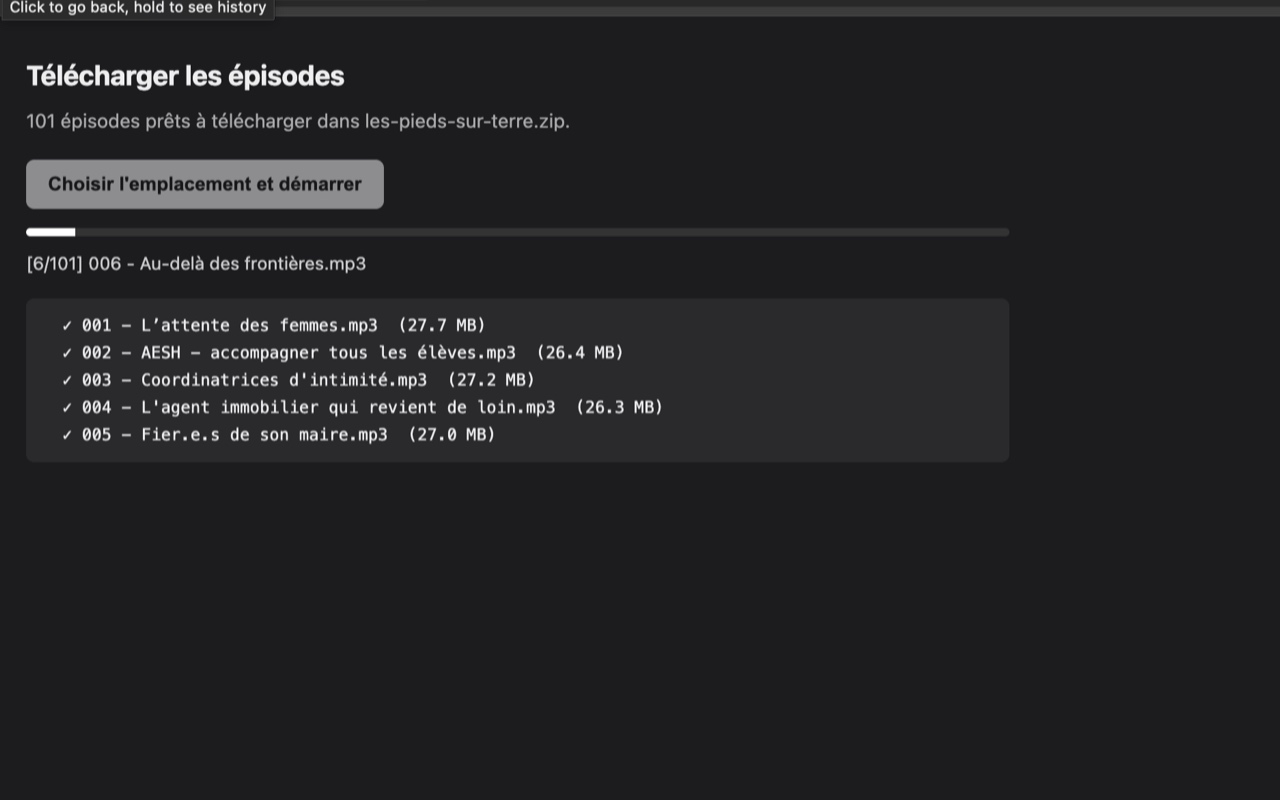
- Un nouvel onglet s’ouvre → cliquer « Choisir l’emplacement et démarrer ».
- Sélectionner où enregistrer le
.zip→ l’archive se construit en streaming.
Tu obtiens un seul fichier nom-du-podcast.zip contenant tous les mp3 nommés NNN - Titre.mp3.
Script Python
python3 scripts/download_episodes.py                       # auto-trouve le HTML local
python3 scripts/download_episodes.py path/vers/page.html   # ou chemin explicite
Le script cherche un fichier HTML dans ./ ou ./_archives/ (à toi de l’enregistrer depuis le navigateur), extrait les épisodes, et télécharge tout dans ./mp3/. Idempotent.
Script Bash + curl
./scripts/download_episodes.sh                              # re-fetch depuis radio-podcast.fr
./scripts/download_episodes.sh chemin/vers/page.html        # parse un fichier local
./scripts/download_episodes.sh -o ./autre-dossier           # destination custom
Comment ça marche
Streaming dans un seul ZIP (extension)
L’extension fetche chaque mp3 et pipe les octets directement dans un fichier .zip choisi par l’utilisateur via showSaveFilePicker, à travers un writer ZIP maison (mode STORE, data descriptors).
L’utilisation mémoire reste bornée : aucun fichier n’est jamais bufferisé entièrement en RAM, même pour une archive de plusieurs Go.
Convention de nommage
NNN - Titre.mp3 :
- Numéro paddé sur 3 chiffres
- Caractères OS-unsafe remplacés :
/→-;:→ ` -` - Entités HTML décodées (
,&,', …) - Apostrophes courbes et accents préservés
Architecture extension
| Fichier | Rôle |
|---|---|
content.js |
Injecté sur les pages radio-podcast.fr/podcast/* ; bouton flottant + extraction DOM des data-mp3 |
popup.js |
UI alternative via l’icône toolbar |
background.js |
Service worker, ouvre l’onglet de téléchargement avec la liste d’épisodes |
downloader.html + downloader.js |
Page dédiée qui fetch + stream le ZIP via showSaveFilePicker |
zip-writer.js |
Writer ZIP maison (STORE, data descriptors, UTF-8) |
Développement
Builder l’extension
./scripts/build-extension.sh
Produit dans dist/ :
extension-webstore.zip— à uploader sur le Chrome Web Storeextension.crx— version signée pour distribution privée (requiert unechrome-extension.pemlocale)
Layout du projet
.
├── README.md                  # Ce fichier
├── LICENSE                    # MIT
├── PRIVACY.md                 # Politique de confidentialité (Web Store)
├── chrome-extension/          # Sources de l'extension (MV3)
├── scripts/
│   ├── build-extension.sh     # Build des artefacts dans dist/
│   ├── download_episodes.py   # Script Python
│   └── download_episodes.sh   # Script Bash + curl
└── store-assets/              # Icône + screenshots pour la fiche Web Store
Confidentialité
L’extension ne collecte, ne stocke et ne transmet aucune donnée personnelle. Voir PRIVACY.md ou la version publiée : https://rilax117.github.io/radio-podcast-downloader/PRIVACY
Licence
MIT © 2026 rilax117
Radio Podcast Downloader
🇬🇧 English · 🇫🇷 Version française
Bulk-download every episode of a radio-podcast.fr podcast into a single
.zipfile.
Three interchangeable tools:
- 🌐 Chrome extension — one button on the page, one “where to save” prompt, one
.zip. - 🐍 Python script —
python3 scripts/download_episodes.py, zero external dependencies. - 🐚 Bash + curl script —
./scripts/download_episodes.sh, self-contained.
Why?
The site radio-podcast.fr lists hundreds of episodes per podcast (France Culture, France Inter, etc.), each downloadable individually. For a 100+ episode series, that’s 100+ clicks and 100+ entries in Chrome’s downloads bar.
This tool does the job in a single operation: it extracts URLs from the DOM, downloads every mp3, and packs them as a stream into a single ZIP archive with readable filenames like 001 - Title.mp3.
Installation
Chrome extension
⏳ Chrome Web Store publication is pending review.
In the meantime, manual install (developer mode):
- Clone this repo or download the latest ZIP and extract it.
- Open
chrome://extensions/. - Enable Developer mode (toggle, top right).
- Click “Load unpacked” → select the
chrome-extension/directory.
Python / Bash scripts
Nothing to install — both scripts only use tools preinstalled on macOS (Python 3, Bash, curl, perl).
Usage
Chrome extension
The extension activates on any radio-podcast.fr/podcast/* page (not just Les Pieds sur Terre — works for any series on the site).
- Open a podcast’s index page.
- Click “Télécharger tous les épisodes” (floating panel top-right, or popup icon in the toolbar).
- A new tab opens → click “Choisir l’emplacement et démarrer”.
- Pick where to save the
.zip→ the archive is built as a stream.
You get a single file podcast-name.zip containing all the mp3s named NNN - Title.mp3.
Python script
python3 scripts/download_episodes.py                       # auto-finds local HTML
python3 scripts/download_episodes.py path/to/page.html     # or explicit path
The script looks for an HTML file in ./ or ./_archives/ (saved from the browser by you), extracts the episodes, and downloads everything into ./mp3/. Idempotent.
Bash + curl script
./scripts/download_episodes.sh                              # re-fetch from radio-podcast.fr
./scripts/download_episodes.sh path/to/page.html            # parse a local file
./scripts/download_episodes.sh -o ./other-folder            # custom output dir
How it works
Single-ZIP streaming (extension)
The extension fetches each mp3 and pipes the bytes directly into a .zip file the user chose via showSaveFilePicker, through a hand-rolled ZIP writer (STORE mode, data descriptors).
Memory usage stays bounded: no file is ever fully buffered in RAM, even for multi-GB archives.
Filename convention
NNN - Title.mp3:
- Number zero-padded to 3 digits
- OS-unsafe characters replaced:
/→-;:→ ` -` - HTML entities decoded (
,&,', …) - Curly apostrophes and accents preserved
Extension architecture
| File | Role |
|---|---|
content.js |
Injected on radio-podcast.fr/podcast/* pages; floating button + DOM extraction of data-mp3 |
popup.js |
Alternative UI via the toolbar icon |
background.js |
Service worker, opens the download tab with the episode list |
downloader.html + downloader.js |
Dedicated page that fetches + streams the ZIP via showSaveFilePicker |
zip-writer.js |
Hand-rolled ZIP writer (STORE, data descriptors, UTF-8) |
Development
Build the extension
./scripts/build-extension.sh
Produces in dist/:
extension-webstore.zip— to upload to the Chrome Web Storeextension.crx— signed version for private distribution (requires a localchrome-extension.pem)
Project layout
.
├── README.md                  # This file
├── LICENSE                    # MIT
├── PRIVACY.md                 # Privacy policy (Web Store)
├── chrome-extension/          # Extension sources (MV3)
├── scripts/
│   ├── build-extension.sh     # Build artifacts into dist/
│   ├── download_episodes.py   # Python script
│   └── download_episodes.sh   # Bash + curl script
└── store-assets/              # Icon + screenshots for the Web Store listing
Privacy
The extension does not collect, store, or transmit any personal data. See PRIVACY.md or the published version: https://rilax117.github.io/radio-podcast-downloader/PRIVACY
License
MIT © 2026 rilax117